iFamily vs Babysense Baby Monitors: Which Brand Fits You?
As an Amazon Associate we earn from qualifying purchases. Links on this page are affiliate links.
When you compare the iFamily vs babysense baby monitor options, you face a choice between a complete standalone system and an add-on camera. The iFamily unit includes a 5-inch parent display, a 30-hour battery, and 2.4GHz FHSS connectivity for private, app-free viewing. Babysense offers a MaxView add-on camera that pairs with a separate parent unit. Both provide remote pan, tilt, and zoom capabilities. The main difference lies in their form factor: one is a self-contained monitor, while the other expands an existing system.
Key differences
| Aspect | iFamily 5-Inch Pan-Tilt Baby Monitor | Babysense MaxView Add-On Pan and Tilt Camera |
|---|---|---|
| Form Factor | Standalone monitor with 5-inch screen | Add-on camera only (parent unit sold separately) |
| Connectivity | 2.4GHz FHSS, no Wi-Fi required | Not listed |
| Battery Life | 30 hours | Not listed |
| Night Vision | Invisible high-powered infrared LED | Night vision |
| Expansion | Up to 4 cameras | Up to 4 cameras |
| Range | 960 feet | 1000 feet |
Which one should you choose?
Choose iFamily 5-Inch Pan-Tilt Baby Monitor if
- You need a complete system with a built-in screen and long battery life
- You prefer a secure, private connection without Wi-Fi or apps
- You want to view your baby on a dedicated 5-inch display
Choose Babysense MaxView Add-On Pan and Tilt Camera if
- You already own a Babysense MaxView parent unit
- You need an additional camera for a second room
- You want to expand your existing monitoring setup
Verdict: Choose the iFamily monitor if you need a complete, standalone solution with a large screen and long battery life. Select the Babysense MaxView add-on only if you already have the compatible parent unit and need extra camera coverage. Both brands offer remote pan and tilt features for flexible viewing.
iFamily vs Babysense Monitor Specs
System completeness
The iFamily model is a standalone system that includes the parent unit with a 5-inch screen and the camera. You get a complete package for immediate use. The Babysense item is an add-on camera only. It requires a separate MaxView video monitor parent unit to function. You cannot use it independently. This makes the iFamily option more convenient for new buyers who want everything in one box. The Babysense unit is designed for parents who already own the compatible parent display.
Connectivity privacy
The iFamily monitor uses 2.4GHz FHSS wireless technology. It operates without Wi-Fi. This setup avoids the need for apps or accounts. You do not risk external hacks through your home network. The Babysense data does not specify its exact wireless protocol. It lists night vision and two-way audio features. However, it does not clarify if it uses Wi-Fi or a proprietary radio frequency. For buyers prioritizing a closed, app-free system, the iFamily connectivity method is clearly defined and private.
Battery life
The iFamily camera specifies a 30-hour battery life. This allows for extended monitoring without needing a constant power outlet nearby. The Babysense add-on camera does not list a battery capacity or runtime in the provided data. It mentions tabletop or wall mounting options. This suggests it may rely on wired power or has unspecified battery metrics. If portable monitoring without frequent charging is a priority, the iFamily battery specification is a clear advantage.
Expandability
Both brands support multi-camera setups. The iFamily allows for an expansion option of up to four cameras. You can add more units to monitor different rooms. The Babysense system also supports pairing up to four cameras to the MaxView monitor. This feature is available for both systems. You can monitor multiple children or areas with either option. The expandability limit is identical for both brands, making this a tie for families needing multiple views.
Mounting options
The iFamily camera can be configured via wall mount or placed on a tabletop. This gives you flexibility in nursery setup. The Babysense add-on camera also supports tabletop or wall mounting. It includes a wall mount screw set for installation. Both products offer similar physical placement choices. You can position either camera securely on a shelf or attach it to a wall. The mounting flexibility is equivalent for both brands.
Range and features
The iFamily camera offers a range of up to 960 feet. It includes features like temperature display, two-way audio, lullabies, and eco mode voice activation. The Babysense data lists a 1000ft range in its attributes. It also includes two-way talk-back audio, lullabies, and a temperature sensor. Both provide essential monitoring tools. The Babysense range is slightly higher at 1000 feet compared to 960 feet. Both include similar core features for comfort and monitoring.
Which Baby Monitor Fits Your Needs
Parents wanting a complete standalone system
The iFamily unit is a complete standalone system. It includes the 5-inch parent display and the camera in one package. You do not need to buy a separate parent unit. The 2.4GHz FHSS connectivity ensures private, app-free viewing. This setup is ideal if you want immediate use without additional hardware purchases.
Families monitoring multiple children in different rooms
The Babysense MaxView is an add-on camera designed for expandability. You can pair up to four cameras to your existing MaxView monitor. This allows you to monitor multiple rooms from a single parent unit. It is the practical choice if you already own the base monitor and need extra coverage for other children.
Users prioritizing long battery life and privacy
The iFamily model features a 30-hour battery life for extended use. Its 2.4GHz FHSS connection operates without Wi-Fi, safeguarding your privacy. There are no accounts or apps to download, reducing hack risks. This spec-focused approach suits you if you value offline operation and long-lasting power for reliable monitoring.
Existing Babysense owners adding a second camera
This Babysense item is an add-on camera only. It requires the MaxView Video Baby Monitor, which is supplied separately. It is not suitable for any other model. If you already have the parent unit, this is the correct choice to expand your system with motorized pan and tilt capabilities.
The products compared

iFamily 5-Inch Pan-Tilt Baby Monitor
Best for: Privacy-focused parents needing large screens
- Connectivity
- Non-Wi-Fi 2.4GHz FHSS
- Screen Size
- 5"
- Pan and Tilt
- Remote pan-tilt-zoom
- Night Vision
- Infrared
- Placement
- Wall mount, tabletop
- Power Source
- Battery Powered
View on Amazon: iFamily 5-Inch Pan-Tilt Baby Monitor Affiliate link
The iFamily SM650 is a dedicated video baby monitor featuring a 5-inch screen and 30-hour battery life. It uses 2.4GHz FHSS wireless connectivity without Wi-Fi, ensuring a private connection. The unit offers remote pan, tilt, and zoom controls along with infrared night vision. You get two-way audio, temperature display, and lullabies. It supports up to four cameras and includes voice-activated eco mode to conserve power.
Pros
- 5-inch display for clear viewing
- 30-hour battery life
- Remote pan, tilt, and zoom
- No Wi-Fi or app required
- Infrared night vision
Cons
- No color night vision capability
- Limited to 2.4GHz frequency band
- No smart home integration
Good fit if
- You want a private, offline connection
- You need long battery life
- You prefer a large 5-inch screen
Skip if
- You require Wi-Fi connectivity
- You want color night vision
- You need smart app control
Verdict: The iFamily 5" Baby Monitor with 30Hr Battery suits parents who prioritize privacy and screen size over smart features. It delivers reliable offline monitoring with a large display and extended battery life.
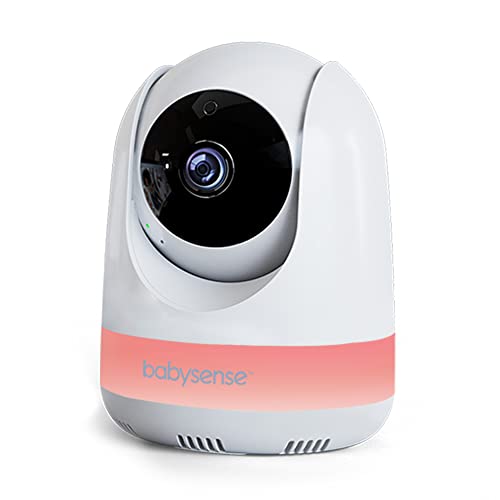
Babysense MaxView Add-On Pan and Tilt Camera
Best for: expanding an existing Babysense MaxView system
- Pan and Tilt
- Motorized remote pan & tilt
- Night Vision
- Night vision
- Placement
- Tabletop or wall mounting
- Features
- Pan/Tilt, Night Vision, Two-Way Audio, Lullabies, Temperature Sensor
- Use
- Baby
- Screen Size
- 5 Inch
View on Amazon: Babysense MaxView Add-On Pan and Tilt Camera Affiliate link
This Babysense unit is an add-on camera for the MaxView monitor system. It features motorized remote pan and tilt to adjust the view. The camera supports night vision and two-way audio. You can pair up to four cameras to one parent unit. It weighs 12 ounces and mounts on a table or wall. This option suits parents who need to monitor multiple rooms with the existing Babysense MaxView base.
Pros
- Motorized remote pan and tilt
- Expandable to four cameras
- Night vision capability
- Two-way talk-back audio
Cons
- Requires separate MaxView parent unit
- Not compatible with other monitor brands
- Sold as an add-on camera only
Good fit if
- You already own a Babysense MaxView monitor
- You need to monitor more than one room
- You want remote pan and tilt control
Skip if
- You do not have a Babysense MaxView parent unit
- You need a standalone monitor system
- You want to use other camera brands
Verdict: Babysense MaxView Add-On Camera is a practical expansion for existing Babysense MaxView owners. It adds remote pan and tilt to your current setup. This unit is ideal for multi-room monitoring if you already have the base system.
Specifications side by side
| Spec | iFamily 5-Inch Pan-Tilt Baby Monitor | Babysense MaxView Add-On Pan and Tilt Camera |
|---|---|---|
| Connectivity | Non-Wi-Fi 2.4GHz FHSS | not stated |
| Screen Size | 5" | not stated |
| Pan and Tilt | Remote pan-tilt-zoom | Motorized remote pan & tilt |
| Night Vision | Infrared | Night vision |
| Placement | Wall mount, tabletop | Tabletop or wall mounting |
| Power Source | Battery Powered | not stated |
| Features | Pan/Tilt, Night Vision, Two-Way Audio, Lullabies | Pan/Tilt, Night Vision, Two-Way Audio, Lullabies, Temperature Sensor |
| Use | Baby | Baby |
| Color | Black | US |
| Battery Life | not stated | 1000ft Range |
| Weight | not stated | 12 ounces |
| Model | SM650 | MaxView-ADDON-US |
| Size | not stated | 5.5 Inch Add-On |
Frequently asked questions
Can I use the Babysense camera without a parent unit?
No. The Babysense MaxView Add-On Camera is designed exclusively as an expansion unit. It requires an existing Babysense MaxView base system to function. You cannot use it as a standalone monitor. This unit adds pan and tilt capabilities to your current setup for multi-room viewing.
Does the iFamily monitor require a Wi-Fi connection?
No. The iFamily 5-Inch Pan-Tilt Baby Monitor operates on 2.4GHz FHSS connectivity. It provides reliable offline monitoring without needing an app or internet connection. This setup ensures private viewing and avoids potential network interruptions. You get direct communication between the parent display and the camera.
What features does the Babysense add-on camera include?
The Babysense MaxView Add-On Camera includes pan and tilt, night vision, two-way audio, lullabies, and a temperature sensor. These features allow you to adjust the view remotely and check room conditions. It is an ideal expansion for existing owners who need more control over their monitoring setup.
How long does the iFamily parent unit battery last?
The iFamily 5-Inch Pan-Tilt Baby Monitor offers a 30-hour battery life. This extended duration supports reliable offline monitoring for extended periods. You do not need to keep the parent unit plugged in constantly. The battery power source ensures flexibility for carrying the display around your home.
Is the iFamily monitor suitable for privacy-focused parents?
Yes. The iFamily unit prioritizes privacy by using 2.4GHz FHSS connectivity. It delivers reliable offline monitoring without connecting to the internet or requiring an app. This approach keeps your video feed local and secure. You avoid potential data breaches associated with cloud-connected smart devices.
What is the screen size of the iFamily parent display?
The iFamily 5-Inch Pan-Tilt Baby Monitor features a 5-inch parent display. This large screen size allows for clear viewing of your baby. It suits parents who need a bigger visual area for better detail. The black color option provides a standard, discreet look for your nursery or bedroom.
Can I add the Babysense camera to other brands?
No. The Babysense MaxView Add-On Camera is specific to the Babysense MaxView system. It is not compatible with other brands or third-party parent units. This unit is ideal for multi-room monitoring only if you already own the base Babysense system. It expands your existing setup rather than replacing it.