eufy Security Indoor Cam E220 Pan vs eufy Security eufyCam C35 Wireless Camera (2026): Key Differences
As an Amazon Associate we earn from qualifying purchases. Links on this page are affiliate links.
When you compare the eufy security indoor cam e220 vs eufycam c35, you see two distinct approaches to home surveillance. Both devices connect via 2.4 GHz Wi-Fi and offer AI detection for people and pets. The main difference lies in their design and placement. The E220 is a dedicated indoor pan-and-tilt camera. The C35 is a wireless, weather-resistant unit for both indoor and outdoor use. Your choice depends on where you need to look and how you want to mount the device.
Key differences
| Aspect | eufy Security Indoor Cam E220 Pan and Tilt | eufy Security eufyCam C35 Wireless Camera |
|---|---|---|
| Placement | Indoor | Indoor and outdoor |
| Form Factor | Pan and Tilt | Fixed Solocam |
| Video Resolution | Up to 2K (1080p with HomeKit) | Not listed |
| Night Vision | Not listed | Spotlight-free color |
| Mounting | Not listed | Magnetic or screw-free |
Which one should you choose?
Choose eufy Security Indoor Cam E220 Pan and Tilt if
- You need a camera that automatically tracks movement across a room with 360-degree coverage.
- You require a dedicated indoor unit with pan-and-tilt functionality for pet or child monitoring.
- You want higher resolution video clarity for indoor scenes, up to 2K.
Choose eufy Security eufyCam C35 Wireless Camera if
- You need a weather-resistant camera for outdoor installation or indoor wall mounting.
- You prefer a quick, tool-free setup using the magnetic base.
- You want color night vision without using a spotlight to avoid disturbing your surroundings.
Verdict: The E220 is the better choice for indoor rooms where you need active tracking and wide-angle coverage. The C35 suits those who need a versatile, weatherproof camera for outdoor or fixed indoor spots with easy magnetic mounting. Select the E220 for dynamic indoor monitoring, and the C35 for flexible, rugged placement.
eufy E220 vs C35 Specs
Placement versatility
The eufy Security Indoor Cam E220 Pan and Tilt is designed strictly for indoor use. Its compact form factor suits living rooms or hallways. In contrast, the eufy Security eufyCam C35 Wireless Camera supports both indoor and outdoor placement. This flexibility allows you to mount it on exterior walls or fences using its magnetic base. If you need a single device for perimeter monitoring, the C35 offers broader utility. The E220 remains limited to interior environments where weather is not a concern.
Pan and tilt range
You get comprehensive room coverage with the eufy Security Indoor Cam E220 Pan and Tilt. It delivers 360-degree pan and tilt coverage, allowing it to track moving objects automatically. This feature ensures you do not miss activity in corners. The eufy Security eufyCam C35 Wireless Camera does not list pan or tilt capabilities in its specifications. It relies on a fixed field of view. If you require automated tracking and full room scanning without blind spots, the E220 provides a clear mechanical advantage for interior monitoring.
Video resolution clarity
The eufy Security Indoor Cam E220 Pan and Tilt records in up to 2K clarity. This high resolution helps you identify details inside your home. Note that resolution drops to 1080p when using Apple HomeKit. The eufy Security eufyCam C35 Wireless Camera does not specify its video resolution in the provided data. Without this information, you cannot compare pixel density directly. However, the E220 explicitly states its superior resolution potential for indoor surveillance, making it a strong choice for identifying fine details.
Night vision capabilities
The eufy Security eufyCam C35 Wireless Camera features spotlight-free color night vision. This technology reveals true colors and critical details like faces or license plates in total darkness. It provides clear evidence without disturbing neighbors with bright lights. The eufy Security Indoor Cam E220 Pan and Tilt does not list specific night vision types in its data. While it likely uses standard infrared, the C35’s color night vision offers a distinct advantage for identifying subjects in low-light outdoor or indoor scenarios.
Audio communication
The eufy Security Indoor Cam E220 Pan and Tilt includes built-in two-way audio. This feature lets you speak in real-time to anyone passing through the camera’s view. You can communicate with pets or visitors directly. The eufy Security eufyCam C35 Wireless Camera does not mention two-way audio in its specifications. If you need to talk through the camera to deter intruders or comfort pets, the E220 provides this interactive capability. The C35 focuses on recording and alerts rather than live communication.
Storage and subscriptions
The eufy Security eufyCam C35 Wireless Camera supports local storage via microSD cards ranging from 32 GB to 256 GB. It explicitly states there are no monthly fees for cloud storage or AI features. The eufy Security Indoor Cam E220 Pan and Tilt does not list storage options or subscription models in its data. You cannot determine if it requires a base station or cloud plan. The C35 offers transparent local storage with no recurring costs, which is a significant practical benefit for long-term ownership.
Connectivity standards
Both cameras rely on 2.4 GHz Wi-Fi networks for connectivity. The eufy Security Indoor Cam E220 Pan and Tilt explicitly notes that it does not support 5 GHz Wi-Fi. The eufy Security eufyCam C35 Wireless Camera also uses stable 2.4 GHz Wi-Fi for reliable transmission. Since both devices operate on the same frequency band, there is no difference in network compatibility. You must ensure your router broadcasts on 2.4 GHz for either camera to function correctly. This aspect results in a tie for both products.
Choose the Right eufy Camera for You
You need full room coverage for pets
The E220 features a pan-and-tilt system that delivers 360-degree coverage. It automatically tracks moving objects, ensuring you never miss activity in corners. Its on-device AI distinguishes between humans and pets, recording only relevant events. You get up to 2K clarity to see details clearly inside your home.
You want flexible outdoor and indoor mounting
The C35 supports both indoor and outdoor placement with magnetic, screw-free mounting. It snaps onto metal surfaces for a secure hold without drilling. This versatility allows you to monitor entryways or yards easily. You avoid complex installation while maintaining a stable 2.4 GHz Wi-Fi connection for reliable monitoring.
You prefer color night vision without lights
The C35 offers spotlight-free color night vision using advanced sensor technology. It reveals true colors and critical details like faces in total darkness. This ensures clear evidence without disturbing neighbors with bright lights. You get instant alerts for people, vehicles, and pets with no monthly fees for cloud storage.
The products compared
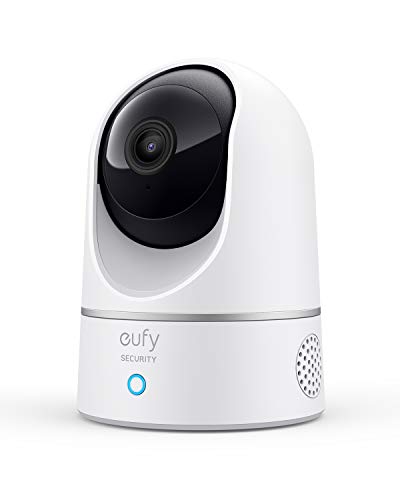
eufy Security Indoor Cam E220 Pan and Tilt
Best for: Indoor pet monitoring with 360-degree coverage
- Video Resolution
- 2K (1080p with HomeKit)
- Power Source
- Plug-in
- Connectivity
- 2.4 GHz Wi-Fi
- Placement
- Indoor
- Pan And Tilt
- 360° coverage
- Camera Count
- 1
View on Amazon: eufy Security Indoor Cam E220 Pan and Tilt Affiliate link
The eufy Security Indoor Cam E220 is a white, indoor-only camera designed for pet monitoring. It delivers up to 2K video resolution, though it drops to 1080p when used with Apple HomeKit. The unit features a pan-and-tilt mechanism providing 360-degree coverage and uses on-device AI to detect humans or pets. It connects via 2.4 GHz Wi-Fi only and includes two-way audio for real-time communication.
Pros
- Pan-and-tilt system provides 360-degree room coverage
- On-device AI distinguishes between humans and pets
- Compatible with Apple HomeKit, Google Assistant, and Alexa
- Built-in two-way audio for real-time communication
Cons
- Indoor placement only; not suitable for outdoor use
- Supports 2.4 GHz Wi-Fi only; no 5 GHz connectivity
- Video resolution reduces to 1080p when using HomeKit
Good fit if
- You need to monitor pets inside your home
- You want 360-degree coverage of a single room
- You use Apple HomeKit or other smart assistants
Skip if
- You require outdoor weatherproofing for exterior monitoring
- You need 5 GHz Wi-Fi connectivity for faster data
- You want full 2K resolution while using HomeKit
Verdict: The eufy Security E220 Indoor Pan/Tilt Cam fits users who need a dedicated indoor pet monitor with wide room coverage. It suits those who prioritize local AI detection and smart home integration over outdoor durability or 5 GHz network support.
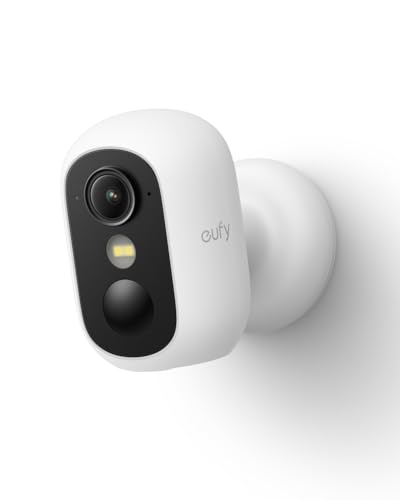
eufy Security eufyCam C35 Wireless Camera
Best for: tool-free installation and local storage
- Connectivity
- 2.4 GHz Wi-Fi
- Placement
- Indoor/Outdoor
- Night Vision Type
- Spotlight-free color
- Weather Rating
- IP67
- Power Source
- Solar Powered
- Features
- Night Vision, Color Night Vision, Spotlight
View on Amazon: eufy Security eufyCam C35 Wireless Camera Affiliate link
The eufyCam C35 is a wireless security camera designed for both indoor and outdoor placement. It features spotlight-free color night vision and 2.4 GHz Wi-Fi connectivity. The device uses a magnetic base for easy mounting without tools. It supports local storage on microSD cards up to 256 GB. This camera suits users who want clear night footage and zero monthly fees for cloud services.
Pros
- Spotlight-free color night vision captures true colors in total darkness
- Magnetic base allows for tool-free, screw-free mounting on metal surfaces
- Local storage on microSD cards eliminates mandatory monthly subscription fees
- AI detection distinguishes between people, vehicles, and pets
Cons
- Limited to 2.4 GHz Wi-Fi connections only
- Not compatible with HomeBase 2 devices
- MicroSD card is not included with the camera
Good fit if
- You need a camera that works in both indoor and outdoor environments
- You want to avoid monthly subscription fees for cloud storage
- You prefer installing cameras without drilling holes or using screws
Skip if
- You require 5 GHz Wi-Fi connectivity for faster data transmission
- You plan to integrate this camera with a HomeBase 2 hub
- You need a camera that includes a microSD card in the box
Verdict: The eufy Security eufyCam C35 Wireless Camera fits renters or homeowners who want flexible placement and local storage without recurring costs. It is ideal for monitoring entry points where tool-free installation and clear night vision are priorities.
Specifications side by side
| Spec | eufy Security Indoor Cam E220 Pan and Tilt | eufy Security eufyCam C35 Wireless Camera |
|---|---|---|
| Video Resolution | 2K (1080p with HomeKit) | not stated |
| Power Source | Plug-in | not stated |
| Connectivity | 2.4 GHz Wi-Fi | 2.4 GHz Wi-Fi |
| Placement | Indoor | Indoor/Outdoor |
| Pan And Tilt | 360° coverage | not stated |
| Night Vision Type | not stated | Spotlight-free color |
| Camera Count | 1 | not stated |
| Weather Rating | not stated | IP67 |
| Resolution | 2K | not stated |
| Features | Night Vision | Night Vision, Color Night Vision, Spotlight |
| Use | Pets | not stated |
| Color | White | White |
| Dimensions | 2.97 × 2.97 × 4.21 inches | 2.24 × 2.32 × 2.38 inches |
| Weight | 10.6 ounces | 12.9 ounces |
| Size | 1 Count (Pack of 1) | Solocam |
| Model | T8410X | T8110 |
Frequently asked questions
Can the eufy Security Indoor Cam E220 Pan rotate 360 degrees?
Yes, the E220 offers full 360-degree horizontal coverage. This pan-and-tilt system allows you to monitor an entire room without dead zones. It is ideal for tracking pets or family members moving across a living space. The mechanical movement ensures comprehensive indoor surveillance.
Is the eufyCam C35 designed for outdoor use?
Yes, the eufyCam C35 is built for outdoor placement. It supports flexible positioning at entry points or perimeter areas. The wireless design simplifies installation in locations without existing power sources. It provides clear night vision for monitoring exterior spaces effectively.
Does the E220 require a subscription for basic features?
No, the E220 supports local AI detection without mandatory subscriptions. It distinguishes between humans and pets using on-device processing. This approach keeps your data private and avoids recurring costs. You get essential smart home integration and detection capabilities directly from the camera.
How does the eufyCam C35 handle installation?
The eufyCam C35 features tool-free installation for quick setup. Its wireless connectivity allows placement anywhere without drilling or wiring. This design suits renters or homeowners seeking flexible monitoring options. You can easily adjust its position to cover specific entry points or pathways.
Which camera is better for monitoring pets indoors?
The E220 is better for indoor pet monitoring. Its 360-degree pan and tilt capability covers wide room areas. On-device AI specifically identifies pets, reducing false alerts from other movements. This dedicated indoor design ensures you never miss activity in corners or hallways.
Does the eufyCam C35 use local storage?
Yes, the eufyCam C35 supports local storage options. This feature allows you to save footage without paying for cloud services. It is ideal for users who want to avoid recurring costs while maintaining secure data. The wireless design complements this flexible storage approach.
Can the E220 track moving objects automatically?
Yes, the E220 automatically tracks moving objects. Its pan-and-tilt mechanism follows activity to keep subjects in frame. This feature ensures continuous monitoring of pets or family members. The AI detection helps distinguish between humans and pets for more accurate tracking.
Is the eufyCam C35 suitable for entry points?
Yes, the eufyCam C35 is suitable for entry points. Its wireless design allows flexible placement at doors or gates. Clear night vision ensures visibility in low-light conditions. The tool-free installation makes it easy to secure specific areas without complex setup procedures.