Babysense or Motorola? Baby Monitors Compared in 2026
As an Amazon Associate we earn from qualifying purchases. Links on this page are affiliate links.
When you compare Babysense vs Motorola baby monitor options, you look at distinct hardware approaches. Both brands provide video monitoring with two-way audio for your nursery. The primary difference lies in screen size and expandability. Babysense offers a larger 5-inch display with motorized pan and tilt controls. Motorola focuses on a compact 4.3-inch screen with dual-camera support. You choose based on whether you prioritize screen real estate or system flexibility.
Key differences
| Aspect | Babysense MaxView Add-On Pan and Tilt Camera | Motorola Dual Camera 4.3" Monitor |
|---|---|---|
| Screen Size | 5 Inch | 4.3 Inch |
| Camera Movement | Motorized remote pan & tilt | not listed |
| Camera Configuration | Add-on unit for MaxView | Dual camera included |
| Connectivity | Long Range | 2.4 GHz FHSS |
Which one should you choose?
Choose Babysense MaxView Add-On Pan and Tilt Camera if
- You want a larger 5-inch screen for clearer viewing.
- You need motorized pan and tilt to track movement remotely.
- You are adding a camera to an existing Babysense MaxView system.
Choose Motorola Dual Camera 4.3" Monitor if
- You prefer a compact 4.3-inch display.
- You need a complete system with two cameras included.
- You rely on 2.4 GHz FHSS wireless technology.
Verdict: Choose the Babysense MaxView add-on if you already own the parent unit and want a larger screen with motorized tracking. Select the Motorola MBP483XL-2 if you need a ready-to-use dual-camera setup with a smaller display. Your decision depends on whether you prioritize screen size or an included second camera.
Key Specs Compared Side by Side
Screen size
Babysense MaxView uses a 5-inch display for its parent unit, offering a larger viewing area for your nursery feed. Motorola provides a 4.3-inch diagonal color screen. The extra inch on the Babysense unit gives you more detail when checking on your child. Motorola’s screen is smaller but still functional for basic monitoring. You should consider which size fits your preference for visibility. A larger screen helps you see more of the room without zooming in. The difference is noticeable when you need to check on small movements or details in the dark.
Camera movement
Babysense includes a motorized camera with remote pan and tilt capabilities. You can control the view from the parent unit to scan the room. Motorola does not list motorized pan or tilt features for this model. You would need to manually adjust the camera position if you want to change the angle. Babysense also offers wall mounting or tabletop options for this flexible positioning. Motorola’s camera setup appears fixed, relying on your initial placement. If you want to track a moving toddler, Babysense offers a clear advantage here.
Expandability
Babysense MaxView supports multi-camera expandability. You can pair up to four cameras to a single MaxView monitor. This allows you to monitor multiple rooms or children from one device. Motorola supports Picture-in-Picture viewing, but this requires an additional camera sold separately. Both brands allow you to add more units later. Babysense explicitly states its capacity for up to four cameras. Motorola’s documentation highlights the Picture-in-Picture feature for dual cameras. If you plan to monitor several areas, Babysense’s stated capacity is a strong point.
Connectivity
Motorola uses 2.4 GHz FHSS wireless technology for its connection. This frequency-hopping spread spectrum helps reduce interference from other household devices. Babysense does not specify its wireless protocol in the provided data. It relies on a dedicated video monitor link. Motorola’s FHSS technology is a known standard for stable, secure connections in baby monitors. Babysense’s connection method is less defined in the specs. You may prefer Motorola’s specified wireless standard for reliability. Babysense’s range is listed as 1000ft, but the technology type remains unclear.
Audio features
Both units include two-way talk-back audio for communication. Babysense adds lullabies to its feature list. You can play soothing sounds directly from the parent unit. Motorola lists room temperature display and two-way communication but does not mention built-in lullabies. Babysense also includes a temperature sensor. Motorola shows the temperature on the screen. Both provide essential audio and environmental monitoring. Babysense offers the added benefit of lullabies for soothing your child. Motorola focuses on clear communication and temperature checks.
Which baby monitor fits your needs?
Parents needing multi-room monitoring
The Babysense MaxView allows you to pair up to four cameras to a single parent unit. This expandability lets you monitor multiple rooms from one screen. You get motorized remote pan and tilt to cover wider areas. The system supports tabletop or wall mounting for flexible placement in each nursery.
Users wanting compact dual setup
The Motorola MBP483XL-2 includes two cameras in the box. You get a 4.3-inch diagonal color screen for clear viewing. It features 2.4 GHz FHSS Wi-Fi wireless technology for stable connection. The package includes two-way audio and room temperature display, providing essential nursery data without needing extra purchases.
Buyers preferring larger display detail
You get a 5-inch screen on the Babysense unit compared to Motorola's 4.3-inch display. The larger size offers more detail for checking on your child. It also includes night vision and a temperature sensor. You can add lullabies and two-way talk-back audio for comfort. The motorized pan and tilt add coverage control.
The products compared
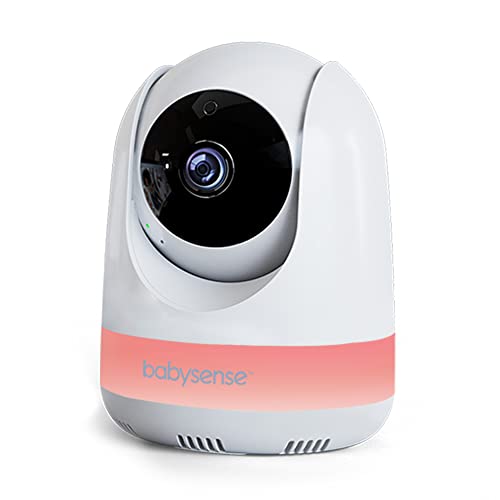
Babysense MaxView Add-On Pan and Tilt Camera
Best for: expanding existing Babysense MaxView systems
- Pan and Tilt
- Motorized remote pan & tilt
- Night Vision
- Night vision
- Placement
- Tabletop or wall mounting
- Features
- Pan/Tilt, Night Vision, Two-Way Audio, Lullabies, Temperature Sensor
- Use
- Baby
- Screen Size
- 5 Inch
View on Amazon: Babysense MaxView Add-On Pan and Tilt Camera Affiliate link
This Babysense MaxView add-on camera expands your existing monitor system. It features motorized remote pan and tilt, allowing you to adjust the view from the parent unit. The unit supports night vision and two-way talk-back audio. You can pair up to four cameras for multi-room monitoring. It mounts on a table or wall. This is an additional unit only; the parent monitor is sold separately.
Pros
- Motorized remote pan and tilt
- Expandable to four cameras
- Two-way talk-back audio
- Night vision capability
Cons
- Requires separate MaxView parent unit
- No standalone display screen
- Not compatible with other monitor models
Good fit if
- You already own a Babysense MaxView parent unit
- You need to monitor multiple rooms
- You want remote pan and tilt control
Skip if
- You do not have a compatible Babysense parent unit
- You need a standalone monitor with a built-in screen
- You want to use it with a different brand's system
Verdict: Babysense MaxView Add-On Camera is the correct expansion for existing Babysense MaxView owners who need extra coverage. It adds remote pan and tilt to your current setup without requiring a new base monitor.

Motorola Dual Camera 4.3" Monitor
Best for: Parents wanting dedicated screen monitoring
- Connectivity
- 2.4 GHz FHSS
- Camera Count
- 2
- Screen Size
- 4.3"
- Features
- Two-Way Audio
- Use
- Baby
View on Amazon: Motorola Dual Camera 4.3" Monitor Affiliate link
This Motorola monitor features a 4.3-inch diagonal color screen and 2.4 GHz FHSS Wi-Fi wireless technology. It supports picture-in-picture viewing when you add a second camera. The unit includes room temperature display and 360-degree two-way communication. You get digital zoom capabilities for closer inspection. This setup suits parents who want a dedicated handheld display without relying on a smartphone app.
Pros
- 4.3-inch diagonal color screen
- 2.4 GHz FHSS wireless technology
- Picture-in-picture viewing with extra camera
- Room temperature display
- 360-degree two-way audio
Cons
- No smartphone app control listed
- Requires separate purchase for second camera
- Screen size is smaller than 5-inch options
Good fit if
- You prefer a dedicated handheld screen
- You want to monitor multiple rooms
- You need temperature tracking
Skip if
- You require smartphone app access
- You want a larger 5-inch screen
- You need a single-camera bundle
Verdict: Motorola Dual Camera 4.3" Video Baby Monitor offers reliable local monitoring with a clear screen. It fits parents who value dedicated hardware over app-based solutions.
Specifications side by side
| Spec | Babysense MaxView Add-On Pan and Tilt Camera | Motorola Dual Camera 4.3" Monitor |
|---|---|---|
| Connectivity | not stated | 2.4 GHz FHSS |
| Camera Count | not stated | 2 |
| Screen Size | not stated | 4.3" |
| Pan and Tilt | Motorized remote pan & tilt | not stated |
| Night Vision | Night vision | not stated |
| Placement | Tabletop or wall mounting | not stated |
| Features | Pan/Tilt, Night Vision, Two-Way Audio, Lullabies, Temperature Sensor | Two-Way Audio |
| Use | Baby | Baby |
| Battery Life | 1000ft Range | not stated |
| Weight | 12 ounces | not stated |
| Size | 5.5 Inch Add-On | not stated |
| Color | US | not stated |
| Model | MaxView-ADDON-US | not stated |
Frequently asked questions
Does the Babysense MaxView support adding extra cameras?
Yes, it is designed for expansion. The B0C2D458K1 model acts as an add-on camera for existing systems. It allows you to increase coverage without buying a new base monitor. This feature supports remote pan and tilt functionality for your current setup.
What is the screen size difference between these brands?
The Babysense unit features a 5-inch display, while the Motorola option has a 4.3-inch screen. The larger Babysense panel provides a bigger viewing area for the nursery feed. This size difference helps you see more detail on the parent unit.
Can I talk to my baby through the monitor?
Both monitors include two-way audio capabilities. You can speak to your child through the device from the parent unit. This feature allows for remote soothing or communication without entering the room. It is a standard function on both listed models.
Does the Babysense camera have night vision?
Yes, the Babysense MaxView add-on includes night vision. This feature ensures you can see your baby in low-light conditions. The camera also offers temperature sensing and lullabies. These attributes help you monitor the nursery environment around the clock.
Is the Motorola monitor app-based or dedicated?
The Motorola Dual Camera model is a dedicated hardware solution. It relies on a physical 4.3-inch screen rather than a smartphone app. This design suits parents who prefer traditional monitoring without needing to connect to Wi-Fi or use a mobile device.
What is the weight of the Babysense add-on camera?
The Babysense MaxView add-on camera weighs 12 ounces. This lightweight design makes it easy to mount or place in the nursery. The compact size fits well with the 5.5-inch overall unit dimensions. It is a small addition to your existing setup.