Babysense MaxView Add-On Pan Tilt Review (2026): A Spec-Based Look
As an Amazon Associate we earn from qualifying purchases. Links on this page are affiliate links.
This babysense add on camera video review focuses on the MaxView Expandable Camera. It is a dedicated unit designed to pair exclusively with the Babysense MaxView Video Baby Monitor. You cannot use it with other models. The device offers motorized remote pan and tilt capabilities. This allows you to adjust the view from your parent unit. It also includes two-way talk-back audio and night vision. The camera weighs 12 ounces and supports wall or tabletop mounting. You can connect up to four of these units to one monitor for whole-home coverage.
What stands out
- Motorized remote pan and tilt for adjustable viewing angles
- Expandable system supporting up to four cameras per parent unit
- Two-way talk-back audio for communication
- Night vision capability for low-light monitoring
- Wall or tabletop mounting options included
Who it fits
Good fit for
This camera suits parents who already own the Babysense MaxView Video Baby Monitor and need to monitor additional rooms. If you have children in different locations, you can pair up to four cameras to a single parent unit. The motorized pan and tilt feature helps you track movement without physically moving the device. The two-way audio allows you to speak to your child remotely. The compact 12-ounce size fits easily on tables or walls.
Who should skip it
You should look elsewhere if you do not already own the specific Babysense MaxView Video Baby Monitor. This add-on camera is not compatible with any other monitor models. It is not a standalone device with its own screen. If you need a complete system with a parent unit, you must purchase the full MaxView kit. This product is only an expansion unit for existing compatible hardware.
Verdict: The MaxView Add-On Camera is a practical expansion tool for existing Babysense MaxView users. It adds flexible viewing angles and multi-room coverage through motorized pan and tilt.
Key specs explained for Babysense MaxView
Placement: Tabletop or wall mounting
This camera supports flexible installation. You can place it on a flat surface or attach it to a wall using the included screw set. This versatility allows you to position the lens at the optimal angle for your room layout. If you need to monitor a nursery corner or a hallway, this mounting option ensures you can secure the device stably without requiring additional accessories.
Pan and Tilt: Motorized remote pan & tilt
The lens moves automatically via remote control. You can adjust the viewing angle without physically touching the camera unit. This feature is useful for tracking movement across a room or shifting focus between different areas. It saves you from manual adjustments and keeps the device secure in its fixed position while providing dynamic coverage for your monitoring needs.
Night vision
The camera captures video in low-light conditions. This ensures you can monitor the room even when lights are off. It provides visibility during nighttime hours without relying on ambient light. For parents or home users, this means continuous surveillance capability regardless of the lighting environment, allowing you to check on the monitored area at any time of day or night.
Two-Way Talk-Back Audio
This feature allows two-way communication between the parent unit and the camera. You can speak to the room and hear responses. This is practical for soothing a child or addressing a situation remotely. It adds an interactive layer to surveillance, letting you communicate directly through the camera system rather than just observing silently.
Multi-Camera Expandability: Up to four cameras
You can connect multiple units to a single monitor. This allows you to view different rooms on one screen. It is ideal for households with several children or multiple areas to secure. By expanding your system, you maintain a centralized overview without needing separate monitors for each location, streamlining your home surveillance setup.
Design and build details
According to the listing, the Babysense MaxView Add-On Camera weighs 12 ounces. This light weight makes it easy to reposition if you need to adjust the view. The unit measures 5.5 inches, which keeps the footprint small for tabletop use. You can also mount it on a wall. The package includes the necessary screws for this installation. This dual option lets you choose the best spot for your nursery or child’s room without cluttering surfaces.
The camera features motorized remote pan and tilt controls. You do not need to manually move the lens. The listing confirms these movements are handled electronically. This allows you to scan the room from your parent unit without entering the space. The design supports pairing up to four cameras. You can monitor multiple areas from a single screen, provided you have the main MaxView monitor.
Finish and material details are not specified in the data. The listing focuses on functionality rather than aesthetics. You should expect a standard plastic build common for this class of device. The primary design goal is expandability. It integrates seamlessly with the main system. The compact size and mounting flexibility ensure it fits into various room layouts. This practical design supports long-term use as your child grows.
Setup and Daily Operation Guide
This unit requires the Babysense MaxView Video Baby Monitor to function. It does not work with any other model. You must pair the camera to your existing parent unit. The listing notes that the parent unit is supplied separately when purchasing the complete system. This means you cannot use this add-on camera if you do not already own the compatible monitor base.
Once paired, you can control the camera remotely. The motorized pan and tilt features allow you to adjust the view from the parent unit. You do not need to physically move the device. This remote control capability lets you scan the room without entering it. The camera supports tabletop placement or wall mounting. The included screw set facilitates the wall installation option.
For daily use, the device supports multi-camera expandability. You can pair up to four cameras to one MaxView monitor. This allows you to monitor multiple rooms or children from a single screen. The parent unit displays feeds from all paired cameras. The two-way talk-back audio lets you speak to the room. You can also play lullabies through the camera. A temperature sensor provides ambient readings. Night vision ensures visibility in low light. The 5-inch screen on the parent unit displays these feeds. This setup streamlines monitoring by centralizing control and viewing in one place.
Before You Buy This Camera
You must own the Babysense MaxView Video Baby Monitor to use this add-on unit. It does not work with any other model. The listing states the parent unit is supplied separately. You need to check your existing system compatibility before purchasing. This camera pairs up to four units. You can monitor multiple rooms from one screen. The device includes a temperature sensor. You may want to buy extra cameras for larger homes. The unit supports two-way talk-back audio. You can speak to your child remotely. Night vision is included for low light. You should check the wall mount screw set. It is included in the box. This option fits best if you already have the MaxView base. It expands your surveillance without buying a new system. Consider the 5-inch screen size of your current monitor. This add-on is designed specifically for that display. It keeps your setup unified. You avoid mixing different brands. This approach is practical for existing users.
Check before you buy
- Confirm you own the Babysense MaxView Video Baby Monitor.
- Check that you do not have another monitor model.
- Verify the parent unit is included or available separately.
- Ensure you need multi-camera expandability for your home.
The product at a glance
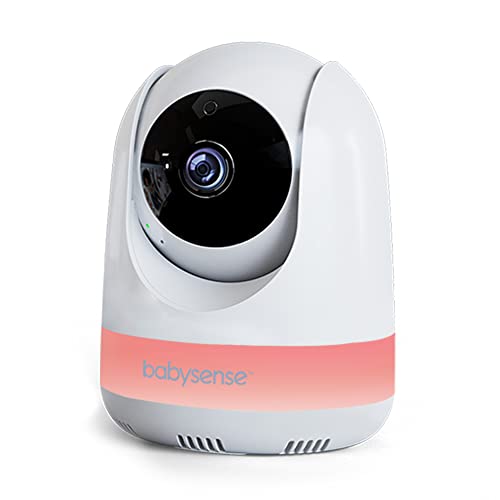
Babysense MaxView Add-On Pan and Tilt Camera
Best for: expanding an existing MaxView monitor system
- Pan and Tilt
- Motorized remote pan & tilt
- Night Vision
- Night vision
- Placement
- Tabletop or wall mounting
- Features
- Pan/Tilt, Night Vision, Two-Way Audio, Lullabies, Temperature Sensor
- Use
- Baby
- Screen Size
- 5 Inch
View on Amazon: Babysense MaxView Add-On Pan and Tilt Camera Affiliate link
This is an additional camera unit for the Babysense MaxView monitor. It features motorized remote pan and tilt, allowing you to adjust the view from the parent unit. The camera supports night vision and two-way talk-back audio. You can pair up to four of these units with one parent display. It weighs 12 ounces and fits on a table or mounts to a wall. This add-on requires a MaxView monitor base.
Pros
- Motorized remote pan and tilt
- Supports up to four cameras
- Includes night vision
- Two-way talk-back audio
Cons
- Requires a separate MaxView parent unit
- Sold as an add-on only
- No standalone screen included
Good fit if
- You already own a Babysense MaxView parent unit
- You need to monitor multiple rooms
- You want remote camera adjustment
Skip if
- You do not have a compatible parent unit
- You need a complete standalone system
- You want to use this with other brands
Verdict: Babysense MaxView Add-On Camera is a practical expansion for existing MaxView owners who need extra coverage. It adds flexible viewing angles to your current setup.
Specifications side by side
| Spec | Babysense MaxView Add-On Pan and Tilt Camera |
|---|---|
| Pan and Tilt | Motorized remote pan & tilt |
| Night Vision | Night vision |
| Placement | Tabletop or wall mounting |
| Features | Pan/Tilt, Night Vision, Two-Way Audio, Lullabies, Temperature Sensor |
| Use | Baby |
| Screen Size | 5 Inch |
| Battery Life | 1000ft Range |
| Weight | 12 ounces |
| Size | 5.5 Inch Add-On |
| Color | US |
| Model | MaxView-ADDON-US |
Frequently asked questions
Does the Babysense MaxView Add-On Camera work with other monitors?
No, this unit is designed exclusively for the Babysense MaxView Video Baby Monitor. You cannot pair it with other brands or models. The listing confirms it requires the specific parent unit to function. You must own the compatible base system before purchasing this add-on for expanded coverage.
What viewing angles does the pan and tilt feature offer?
The camera provides motorized remote pan and tilt capabilities. This allows you to adjust the viewing angle from the parent unit. You can cover more of the room without moving the physical device. The 5.5-inch add-on design keeps the footprint small for tabletop placement.
Can I use this camera for adult surveillance?
The product is listed for baby use. While the hardware supports remote viewing, the marketing targets nursery monitoring. It includes features like lullabies and a temperature sensor tailored for infant care. You should verify if the two-way audio and night vision meet your specific adult surveillance needs.
Does the camera have night vision capabilities?
Yes, the specifications list night vision as a key feature. This allows you to see in low-light conditions. You can monitor your space effectively during the day or night. The feature works in conjunction with the pan and tilt functions for comprehensive remote viewing.
Is there two-way audio on this add-on camera?
Yes, the product includes two-way audio. You can speak through the camera and listen to the room via the parent unit. This feature is useful for communicating with your baby. It integrates with the temperature sensor and lullaby options for a complete monitoring experience.
What is the screen size of the parent unit?
The associated parent unit features a 5-inch screen. This size provides a clear view of the video feed from the add-on camera. The screen size is part of the overall system experience rather than the camera itself. You need the parent unit to view the camera output.
How heavy is the Babysense MaxView Add-On Camera?
The camera weighs 12 ounces. This light weight makes it easy to reposition on a flat surface. You can adjust the location to get the best angle for your room. The 5.5-inch size also contributes to its compact and manageable design for tabletop use.
Does the camera include a temperature sensor?
Yes, the attributes list a temperature sensor. You can monitor the room temperature from the parent unit. This helps you ensure the environment is comfortable for your baby. The sensor works alongside the night vision and audio features for comprehensive monitoring.