Arlo Ultra 4K (3rd Gen) Add-On Camera Review (2026)
As an Amazon Associate we earn from qualifying purchases. Links on this page are affiliate links.
This Arlo Ultra (3rd Gen) listing is an add-on camera, so the first thing to know is that it is meant to join an existing Ultra system rather than start one. If you already run Ultra cameras, it brings the line's top specs: 4K HDR video and a 180-degree field of view, the widest in Arlo's current wire-free range, which helps when one camera has to cover a full yard or a business frontage. Modes, routines and geofencing can arm or disarm it as you come and go. A one-month Arlo Secure trial is included; 60-day history, AI detection and emergency response need a paid plan afterwards, with live view and basic alerts free. The listing is short on hardware detail (no battery, night vision or audio specs are given), so this review sticks to what Arlo publishes rather than hands-on use.
What stands out
- 4K HDR video
- 180-degree field of view
- Add-on for an existing Ultra system
- Geofencing, modes and routines
- 1-month Arlo Secure trial
Who it fits
Good fit for
Owners of an Arlo Ultra system who want one more 4K camera for a wide area.
Who should skip it
First-time buyers: start with an Ultra kit that includes the SmartHub instead.
Verdict: The right way to extend an Ultra setup, not a standalone first camera.
Ultra (3rd Gen) add-on specs explained
4K HDR
More detail for faces and plates than the 2K Pro and Essential lines.
180-degree view
Covers a full yard edge to edge from one mount.
Add-on camera
Designed to join an existing Ultra system.
Geofencing
Arms or disarms automatically by your phone's location.
Listing gaps
No battery life, night vision or audio specs are stated.
Design
A white wire-free bullet-style body, about 2.1 x 3.1 x 3.5 inches per the listing, matching the other Ultra (3rd Gen) cameras.
Day to day with an extra Ultra camera
It shows up alongside your other Ultra cameras in the Arlo app and follows the same modes and schedules. Choose this add-on if you already own an Ultra kit and need 4K on one more area; choose an Ultra kit with SmartHub if you are starting from zero, or an Arlo Pro 6th Gen if 2K over 160 degrees is enough.
Before you add an Ultra camera
Check these first.
Check before you buy
- You already own an Arlo Ultra system
- Plan coverage for one more camera
- Wi-Fi or hub range at the new mount
- Charging kit needs, which the listing does not state
The product at a glance
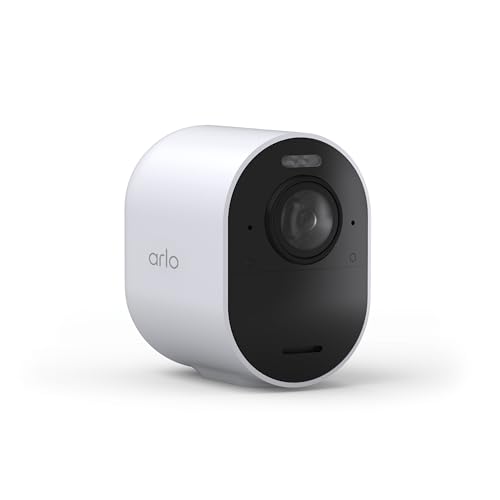
Arlo Ultra 4K HDR Wireless Camera
Best for: Extending Ultra coverage
- Video Resolution
- 4K HDR
- Placement
- Outdoor
- Connectivity
- Wireless
- Color
- White
- Dimensions
- 3.5 × 2.05 × 3.09 inches
View on Amazon: Arlo Ultra 4K HDR Wireless Camera Affiliate link
White VMC5050 add-on camera for an existing Arlo Ultra system: 4K HDR video, 180-degree view, AI detection and emergency response with Arlo Secure, modes, routines and geofencing, 1-month plan trial.
Pros
- 4K HDR detail
- 180-degree view
- Joins existing Ultra setup
Cons
- Needs an existing Ultra system
- Plan needed for AI features
- Sparse hardware specs in listing
Good fit if
- You already run Arlo Ultra cameras
Skip if
- You are buying your first Arlo camera
Verdict: Best for extending an Ultra system.
Specifications side by side
| Spec | Arlo Ultra 4K HDR Wireless Camera |
|---|---|
| Video Resolution | 4K HDR |
| Placement | Outdoor |
| Resolution | 4K |
| Connectivity | Wireless |
| Color | White |
| Dimensions | 3.5 × 2.05 × 3.09 inches |
| Size | Add-on Camera |
| Model | VMC5050 |
Frequently asked questions
Does the Arlo Ultra add-on work on its own?
The listing sells it as an add-on for an existing Ultra system, so plan on having one.
What resolution is the Arlo Ultra (3rd Gen)?
4K HDR.
How wide is the Arlo Ultra (3rd Gen) view?
180 degrees.
Which Ultra features need Arlo Secure?
60-day video history, AI detection and emergency response.
Can the Ultra add-on arm itself when I leave?
Yes, through modes, routines and geofencing in the app.
Featured in
- 6 Best Security Camera Systems Under $300, Compared
- The Best Arlo Security Camera Systems in 2026: 7 Picks
- Best Security Camera Systems with 2 Cameras in 2026: 6 Picks Ranked by Specs
- Best Security Cameras Under $500 in 2026: 12 Picks Ranked by Specs
- Best White Security Camera Systems in 2026: 6 Picks Ranked by Specs
- Best Security Camera Systems Under $500 in 2026: 6 Picks Ranked by Specs
See also
- vikviz 8mp 25x optical zoom review
- funxwe fs19 5mp 5x zoom ptz camera review
- funxwe fs11 5mp 20x zoom ptz camera review
- arlo essential security wireless 2k review
- arlo essential wireless HD security camera review
- Arlo Pro 5S 2K Wireless Review (2026): A Spec-Based Look
- Arlo Pro 5S Spotlight 2K HDR (Renewed) Review (2026): A Spec-Based Look
- Arlo Pro 6th Gen 2K HDR (Renewed) Review: Specs, Pros and Cons
- arlo essential wireless security camera review
- bose quietcomfort ultra wireless noise review